

You’re rolling down the road, daylight is fading, and you realize it’s time to answer the big question every one of us eventually faces: Where are we sleeping tonight?
If you’re an RVer who doesn’t like planning far in advance, or if you experience a last-minute change of plans, read on…
One of the simplest tools you already have, Google, can help you find a campground or RV park near you in seconds. You don’t need a special app or a complicated setup. Just a phone, a signal, and the right search.
We suspect many of you know this already, but if you don’t know how to use Google to find a campsite, this information may change how you RV!
How to use Google’s “find a campground or RV park near me” feature
Step 1: Use the right search phrase
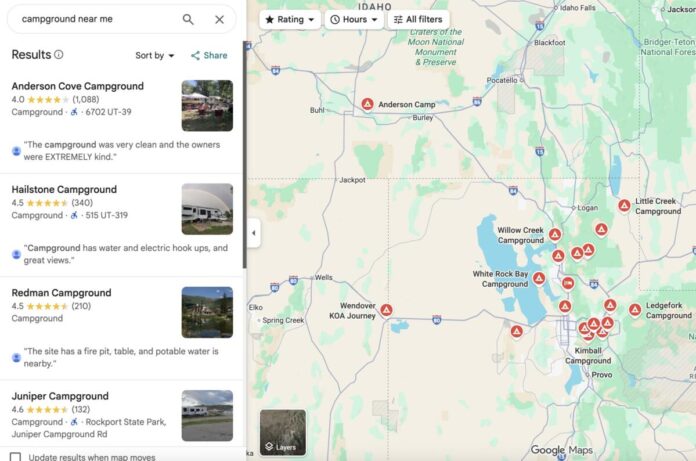
Open Google or Google Maps and type one of these into the search bar:
• “Campground near me”
• “RV park near me”
• “RV campground near me”
• “Camping near me”
Google automatically uses your location to show nearby options—no zip code required. You will have to make sure you’re allowing it to use your location, though (in your settings). More on that below.
Tip: If you want something specific, add it to your search:
• “RV park near me with hookups”
• “State park campground near me”
• “RV park near me open year-round”
Step 2: Switch to map view
Once the results load, you’ll usually see a map at the top of the page.
Tap or click the map. This is where the magic happens.
• Campgrounds and RV parks appear as pins.
• You can zoom in or out to expand your options.
• The map updates as you move it, letting you search ahead of your route.
• This is especially useful if you don’t want to stop exactly where you are but, say, 30 or 50 miles down the road.
Step 3: Tap a listing (and read carefully)
Click on a campground or RV park name to open its full listing. Here’s what to look for:
• Photos – Are they recent? Do sites look roomy or tight?
• Reviews – Skim the most recent ones first
• Amenities – Hookups, dump station, showers, laundry, Wi-Fi
• Notes from other RVers – Road noise, tight turns, staff friendliness
Pro tip: Search within reviews for words like big rigs, quiet, overnight, or late arrival to see if the park fits your needs.
Step 4: Check hours, availability, and phone number
Google listings often show:
• Check-in times
• Seasonal closures
• Whether the park is open today
Note: Don’t assume everything is accurate!
If you’re arriving late or traveling in the off-season, tap the call button to call and confirm:
• They have space
• They allow late check-ins
• Your rig size is okay
A two-minute phone call can save a long, stressful evening.
Step 5: Use filters and follow-up searches
If your first search doesn’t turn up what you want, try variations:
• “RV park near me tonight”
• “Campground near me electric hookups”
• “RV park near me monthly rates”
Google learns as you refine your search, often surfacing better matches the second or third time.
Why this works so well for RVers
Unlike many campground apps, Google:
• Pulls in real-time location data
• Includes small, independent parks
• Shows reviews from actual travelers
• Works instantly without downloads
• It’s especially helpful when plans change, bad weather moves in, or you just decide to stop early.
One last tip
Before you hit the road, turn on Location Services on your phone and make sure Google Maps can access it. That way, when you search “campground near me,” Google knows exactly where “near” is.
Sometimes the best campsite isn’t planned days in advance, it’s the one you find right when you need it, and, who knows, maybe this will help you discover your new favorite campground!
RELATED
- How to find campsites: The latest, and best, tech and tools
- How RVers find their ‘perfect’ campsite in our changing times
- Use artificial intelligence to find available campsites?
RVT1242
We’ve done this. I had the Good Sam app, which was difficult to use and not inclusive of all campgrounds. Google is much easier.
This also works for finding attractions, points of interest, parks, and my favorite, coffee shops!
I’ve started using it more and more for finding local museums, restaurants, etc. when on the road.
One of the good aspects of technology and Google maps has been a key part of my adventures for the past 10 years. Switching between terrain and satellite view helps identify bodies of water which I use for finding fishing/kayaking spots right down to the boat ramps. The traffic features are also excellent and it has bailed me out of heavy traffic many times. I have even converted a few of my technophobe friends to using it when they see how it shows traffic in real time.
That’s how we camped for our 8 years of f/t RV’ing – but that was almost 7 years ago! I didn’t think, by the way people were complaining, anyone could do that any longer! We always used to find great places to stay (and we have a 36′ motorhome w/toad). Loved doing it this way! Only time this doesn’t work is around holidays!
Thank you for the tutorial, Emily! This works best if ones co-pilot is doing the searching. Otherwise, one must find a safe stopping spot to occupy while searching, calling, etc. DW is my co-pilot and uses web searches in addition to her many RV-oriented smart phone applications. We have been left with only over-nighting at Cracker Barrel on two occasions in the previous 8 years of travel. 🙂 Have a great day and safe travels!