


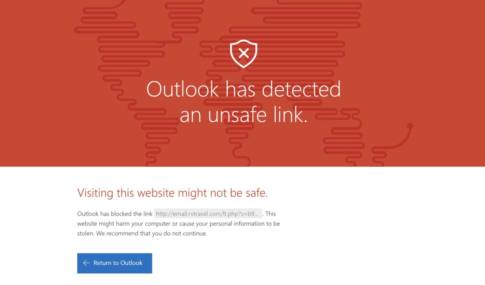
 You came here because at some point in the past week or so you were shown a large red warning screen when you clicked on the link to the newsletter contained in our emails.
This is a false warning for several reasons:
- email.rvtravel.com is our real email domain for our newsletters. We set it up specifically to make sure emails get to your inbox. It’s not a phishing scheme, or a malware site.
- If you look carefully at the image, you’ll see that it is linking to http:// not https://. We would never link to our site without using https://. In fact, our site forces anyone coming to our site using http:// to use https://.
- Microsoft has a feature called Advanced Threat Protection Safe Links. This software program removes the links from our emails and substitutes Microsoft’s supposedly clean link. Clearly this is not happening properly because here we are looking at a link we sent out that started with https:// and now it has http://.
What can you do? Well, you could turn OFF Safe Links. There is an option for MSN.com, hotmail.com, outlook.com or any Office365 subscription to turn Safe Links off. But I don’t recommend you do that. Safe links, while irritating in this case, are, well, safer. If you want to turn off Safe Links, you can contact Microsoft tech support or Google search “turn off safe links for <insert outlook.com, msn.com, hotmail.com or office365>”
Here’s the simplest way to get around this until we can navigate the Microsoft machine and get email.rvtravel.com linked to safely again: Ignore the link that says “Click here to read today’s issue” and click on the Having trouble with the link? Click Here. link directly below that.
Our home page ALWAYS has the latest newsletters and information for you to look at.
Sorry you’re having trouble. We’re working on it and hopefully Microsoft will respond soon.
Thanks,
Kim Christiansen for RVtravel.com


I’ve received the Microsoft warning on a few occasions in the past, but its never consistent. Over the past six months or so, I think twice. I click through the Microsoft warnings and then have no problem reading the newsletter and have never had a computer problem by doing so.
Email is starting to get aggravating!. Ever since the Microsoft discussion started, my RV Travel email had been deposited in my spam folder, which I fish out, mark as ‘not junk’ and move it to my inbox.