

We’ve all heard it: “How much farther?” “I need a restroom!” “We’re almost out of fuel.” “I’m so hungry!”
Reader “billh42” recently pointed us in the direction of the iExit app, which can be a huge help if you travel the interstates in your RV.
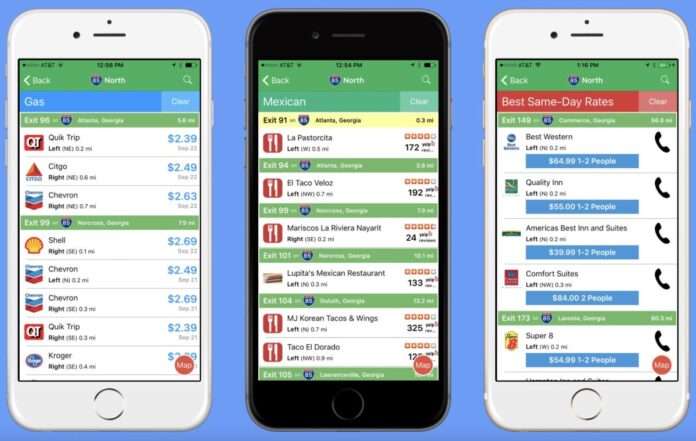
The iExit app tells you what’s coming up at every exit. The app can help you make smarter stops without unnecessary detours.
A little history
Though this app is new to me, it certainly isn’t brand new. iExit launched the app in 2010. Since that time, it’s quickly become a go-to road app for people who want to plan pit stops ahead of time. The app has made major updates throughout its existence to ensure accurate information.
How iExit helps RVers
iExit displays upcoming interstate exits in real time. It tags each exit with easy icons for gas, food, lodging, rest areas, campgrounds, truck/RV parking, and other amenities. That means instead of guessing whether the next exit has diesel or a truck-friendly parking lot, you see it at a glance.
The app also compares fuel options and shows fuel prices by exit (including diesel in many areas). It’s one of the quickest ways to save money when you’re burning through gallons on a cross-country RV trip.
Beyond fuel, iExit helps you find RV-useful stops. These include KOA campgrounds and major chain campgrounds, truck parking and weigh stations, rest areas with amenities, and nearby big-box stores for last-minute supplies.
When you’re towing or need specific services (diesel, RV service centers, or wide-turn truck stops), having a focused interstate exit view cuts out a lot of wasted time.
Save money and time
Seeing options for several exits ahead means you can skip the first mediocre choice and hold out for a lower price on fuel or a better restaurant. I’ve found this to be especially helpful when traveling with kids or if we’re on a tight schedule.
The app also displays hotel deals and promotional rates for exits ahead. That way, if a tired crew needs a room, you can compare options without exiting blindly. These features are part of what reviewers and travel editors have pointed to when recommending the app for road trips.
Double-check
iExit pulls together map/GPS data, crowd-updated fuel prices, and business listings—so most entries are accurate. Reviewers over the years have praised its usefulness for interstate travel while noting that, like any travel database, some listings can lag behind local changes.
I suggest you use the app to narrow your choices. Then tap a business listing for the phone number or GPS map before committing to an exit.
Quick how-to
• On iPhone: Open the App Store, search for iExit (look for the interstate-style green icon), then tap Get. After installation, allow Location access so the app can detect which interstate and exit you’re on. The App Store notes that iExit supports CarPlay, if you want hands-free use on a compatible head unit.
• On Android: Open Google Play, search for iExit Interstate Exit Guide, and install. Allow location permissions and, if prompted, battery/location optimizations so the app can keep updating while you move.
• First run setup: Open iExit, let it detect your position, and pick your favorite categories (Gas, Hotels, Food, Rest Areas, Campgrounds, Truck Parking). Mark chains or places you prefer as Favorites, so they float to the top as you approach the exits. Use the search field to look ahead. (You can search the next several exits, depending on settings.)
You can learn more and/or download the app here.
Using iExit while driving
Keep the phone mounted or use CarPlay. Watch the live exit list as you approach the next few miles. Green bars show exit numbers and distance. Icons show the major services. Tap any business to open details (distance from ramp, phone number, sometimes fuel price). If you want the cheapest fuel at an upcoming exit, use the fuel list to compare by price and exit distance.
Tips for RVers
Before travel, add your must-have amenities to Favorites (e.g., diesel, KOA, RV dump station), and practice a quick check. Approach the exit list, tap a candidate, and confirm clearance/turning room on the destination’s phone or website when in doubt. If you rely on EV charging in a tow-vehicle or tow-car, use the EV charger filter to plan charging stops.
Final notes
iExit is free with ads and offers a small one-time upgrade to remove ads in many versions. It’s designed to complement, not replace, primary navigation apps. Use iExit to pick the best exit and then let your GPS or built-in RV navigator take you the last mile.
Do you use the iExit app? What other apps/travel aids do you use? Tell me using the comments below.
RELATED
- Major Google Maps update could doom trip planner apps
- New app helps motorists with full bladders quickly find where to pee
- This app lets you read historical markers without even stopping
- Top 20 Google Maps hacks, tips, and tricks
- The Next Exit 2025, a book for RVers
RVT1250

Sounds good. We will try it next week as we make our way to Perry, Ga for the FRVA
Rally.
We have used Next Exit book for years, but, while driving, it is not the best solution.
I have IExit on my iphone and it helps us find out where to stop for gas and food. I also use AllStays and Harvest Host plus google Earth as with our 38 ft MH I want to make sure we won’t get stuck somewhere.
Thanks for the iExit App tip. I downloaded it and will try it out. My go to App is Allstays. I’ve used it to plan my trips for years.