

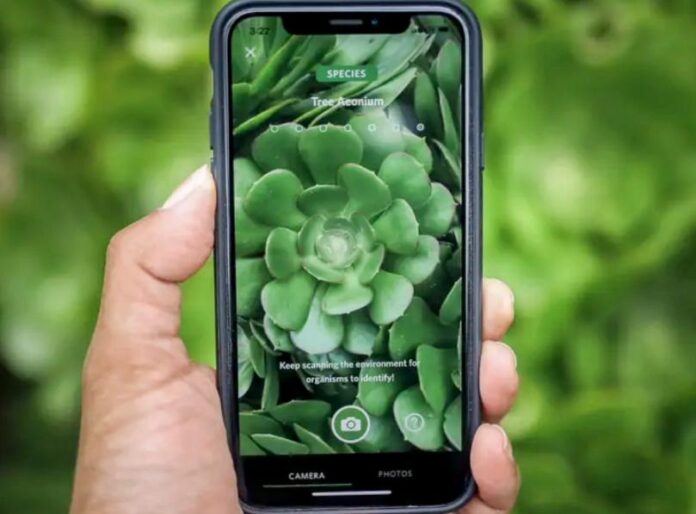
If you’re an RVer, you already know that every roadside stop is a chance to connect with nature and perhaps learn something new.
Whether you’re parked at a scenic overlook or exploring a new campground trail, the Seek app by iNaturalist can transform your RV adventures. Even though I’m retired from teaching, I still love to learn! iNaturalist’s Seek app makes learning fun and easy!
Note: There is another app, also named Seek, that’s an app for finding employment. When you download the nature app, make sure you get the iNaturalist Seek app. (Unless you’re looking for a job, that is.)
What is the Seek app?
Developed by iNaturalist, the Seek app is a free, family-friendly tool for your cell phone. It uses image recognition technology to identify plants, animals, and more in real time.
Seek is designed for users of all ages who want to learn about the world around them. The app’s intuitive nature makes it perfect for RVers who appreciate quick, on-the-go insights into the natural wonders you see as you travel.
Give Seek a try
Life on the road is all about exploration, and your RV trips often lead you to unexpected natural treasures. Here’s why the Seek app is a must-have companion on your journey:
• Instant identification: Simply point your smartphone camera at an intriguing plant or animal and let Seek do the rest. You won’t need to carry bulky field guides. Instead, you’ll get answers in seconds.
• Family-friendly and kid-safe: With no account setup required (unless you want to share your observations), it’s a perfect tool for family trips, encouraging everyone to explore safely. (Our grandkids love using this app!)
• Enhanced nature journaling: Use Seek to quickly record natural species during your adventures. Whether you’re a seasoned nature journal keeper or just starting out, the app helps you build a daily log of the wildlife you encounter.
Step-by-step guide
Follow these steps to locate, download, and use the Seek app:
1. Download and set up. Download the Seek app from the Apple App Store or Google Play Store. Once installed, you can either use it immediately without creating an account. Or, if you wish, you can link it to an iNaturalist account to share findings with other app users.
2. Enable location services. For Seek to work its magic, you should allow the app to access your location. This ensures that it can narrow down species suggestions based on the local environment. This is crucial when you’re in a new area on your RV travels. I always set this to “only while using the app” to ensure privacy.
3. User-friendly menu. Once you open Seek, you’ll find:
• My observations: Quickly review past sightings organized by category.
• Challenges: Participate in monthly challenges that test your naturalist skills (a fun way to add some friendly competition to your road trips).
• Achievements: Earn badges as you build your collection of identified species.
Exploring these sections can not only boost your confidence but also provide inspiration for your next stop along the way.
4. Hit “Home” and start seeking. The heart of the app lies in its camera feature. When you’re ready to identify something:
• Tap the camera icon: This will bring up a reminder to be mindful of your surroundings, important when crossing roads or exploring unfamiliar terrain.
• Scan and snap: Point your camera at the object you want to identify. It might take a few tries or different angles (especially with moving subjects like insects) before a confident match appears.
• Review the results: Once a species is recognized, Seek will show you details and link to further resources like Wikipedia for more in-depth information.
5. Integrate with a nature journal. Many RVers love to document their trips through a nature journal. Here are a few creative ways to do this with the Seek app:
• On-the-spot entries: Identify a plant or animal, then jot down details in your travel journal—note your location, the subject’s habitat, appearance, and any interesting behaviors.
• Species lists: Use Seek to compile a daily or trip-specific list of species observed.
• Photo documentation: Snap photos with Seek, then print them out or include digital copies in your journal. Over time, you’ll build a personalized guide to the natural world you’ve seen on your travels.
Additional tips for RVers
• Plan nature breaks: Schedule short stops as you travel along your planned route. Think: scenic overlooks or park trails. A few minutes with Seek can turn a routine break into a memorable nature encounter.
• Pack a small notebook: Even if you rely on your phone for identification, a small journal for quick notes and sketches can enhance each observation.
• Stay safe: Always be aware of your environment. Follow the app’s reminders—look both ways, don’t disturb wildlife, and avoid tasting plants.
• Share the experience: Whether it’s with family or fellow RVers you meet along the way, sharing your discoveries can spark interesting conversations and inspire more outdoor adventures.
Do you use iNaturalist’s Seek app or another app like it? Tell us about your experience in the comments below.
RELATED
- Stop! Park Service reveals the chilling truth about the ‘eyeball’ plant
- RVers, these poisonous plants could be lurking nearby. Look out!
- This app lets you read historical markers without even stopping
- How to find RV dump stations: Best apps to use
RVT1207

This app really makes my hikes much longer!
Thank you for suggesting the application, Gail! DW may use this. I will ask her. Have a great week and safe travels!
Thanks again, Gail! Yes, DW has and uses this application on her iPhone. In fact, she used it Friday to identify the massive tree that fell and mangled many linear feet of our backyard fence. Now we know that we have one less chinkapin oak in our forest. 🙁 Have a great day and safe travels!