

A hiker’s mishap on a fake trail in British Columbia calls into question internet-provided map data. Past experience has shown you don’t need to be a hiker to get into trouble with a GPS, or internet-provided map data. RVers take note.
Trail not “real” in real life
A hiker near British Columbia’s Mount Fromme found himself stranded in an area filled with bands of cliffs. He evidently thought things would be great, as he was apparently using his cellphone and based his hike on Google Maps. Unfortunately the map misled: The seeming trail wasn’t real in real life and the hiker could find no way out of his situation.

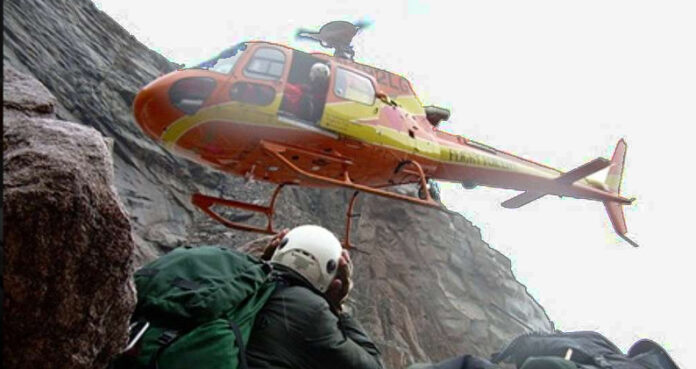
Making matters worse, much of Mount Fromme is covered with thick evergreen trees. When the hiker’s mishap on a fake trail led to a phone call for help, rescuers could only estimate his whereabouts. The heavily treed area kept him from view. A chopper from B.C.’s North Shore Rescue (NSR) lowered two rescuers to a point below where they figured the hiker was. They then climbed a steep slope, finally locating the misled party. All three climbed back down the slope and were pulled back into the waiting helicopter.
Google Maps warned

The rescue agency made plenty of points in its Facebook post on the matter. “To be clear, the area in question has no trails and is very steep with many cliff bands throughout. In the preceding weeks, NSR has actually placed signage in the area warning of this. The area is clearly dangerous, as it was the sight of a previous fatality.”
They added, the individual “may have sought to follow a trail on Google Maps that does not exist. NSR has attempted to contact Google to have this non existent trail (north of Fromme, going towards the vicinity of Kennedy Falls) removed, however we have not received any response.”
Hiker’s mishap on a fake trail a lesson for RVers
For RVers, the fake trail mishap just adds weight to what some have learned in bitter experience. GPS devices are only as good as their map data, and can send you into places you may have a hard time extricating your rig from. What to do? Here’s an article with some excellent tips for GPS-equipped RVers that will help you stay out of trouble.
And if you’re a hiker? Here’s the advice from rescuers. “It is simply not appropriate to navigate in the wilderness using ‘urban street map’ programs like Google Maps. If you are using a phone-based navigation app, consider using something specifically designed for the outdoors such as CalTopo or Gaia, pre-loaded with an appropriate wilderness topo map for the area.”
##RVT1130b

Good warning on GPS usages, thanks for the info Russ and Tina !
Glad this ended so well, but how could he have thought that the mapped trail was real despite all the actual evidence to the contrary?
Wishful thinking? Like, the trail must be just up around that bend? I do a good enough job all by myself of getting lost. I don’t need any of that new-fangled🤔 stuff to get me lost. 😀 –Diane
Likely the party had never or had no experience hiking and understanding trail markers or they would have never set foot on a fake trail. However, some folks think all they need to do anything is a smartphone. Not everyone using Google has had such a fortunate ending.
I am not a seasoned hiker but have done my share of hiking over the years. The trails that I have hiked on in the past LOOK like trails as they are marked and are worn-in from previous hikers. Obviously this guy was forging his own trail so you would think that after a few minutes he would have realized that he was not on a REAL trail. Then he should have turned around and gotten the hell out of there BEFORE he got into trouble and had to be rescued.A little bit of common sense goes a LONG way.
Garmin RV has misled us many times. Very disappointed with the product.
Any GPS device is only as good as the maps it uses. It is very important to ensure that your device has up-to-date maps. It is also a good idea to look at several different maps/devices if you have any doubt. For example, the Gaia app mentioned in the article is very good for wilderness hiking, but you do need to make sure you have the correct maps (there are a number available for any given area), that they are up-to-date, and that you actually take the time to look at them before you head out. One problem I have encountered several times is that it can become impossible to update maps on older devices, and that leaves you with a device that is then basically useless.
i don’t know if Google does this, but commercial printed maps used to include “copyright errors” which were short extra streets or mis-spellings or other innocuous inaccuracies’ so that that they could prove it when they were copied in violation of the copyright.
In urban areas using updated GPS things can go wrong. I have a Rand McNally GPS designed for RVs. Errors presented themselves on a recent cross-country trip. On a rural highway we came to a fork. Go left or right where signage was vague? Knowing our required general compass direction I decided to go left. Same thing at a tee intersection and same thinking process. Once I was committed, GPS agreed with me. Had I guessed wrong, who knows where I could have made a U-turn with a class A towing a car. In my own area, heading north on US Hwy 101 toward San Jose, CA from Gilroy, GPS always tells me to keep right as I approach Hwy 85; 20 years ago that was true. Not with new interchange.