


Dear Dave,
We have two Winegard satellite dishes on the roof, one for each TV so we can operate them independently. Sometimes when we park under trees we want to be able to plug a third dish into the rear satellite connection located in the compartment where the main power cord is located. We get nothing when connected there.
I’ve had an RV comm specialist look at it and he says that the connection in the back is not connected to the dish receivers. He said that if we want to hook up a remote satellite dish, we have to run the coax through a window and hook it directly to a receiver. If so, why did Winnebago provide a rear satellite connection? —Will, 2017 Winnebago Sightseer 33C
Dear Will,
I always love a Winnebago question as I can go to their website and get 3D drawings, wiring diagrams, and find just about anything. But first, I would suggest finding a qualified RV communication specialist.
For years, Winnebago has installed a coaxial (coax) connection either in the service center or other outside compartment with a coax cable prewired to an interior location. When the older models had the “tube”-type televisions that were mounted above the driver and passenger seats, the coax went to a switcher in the overhead compartment.
According to the website, you have a coax faceplate located in the service compartment that looks like this:

Inside the rig, you have another coax faceplate located in the front overhead cabinet that looks like this:
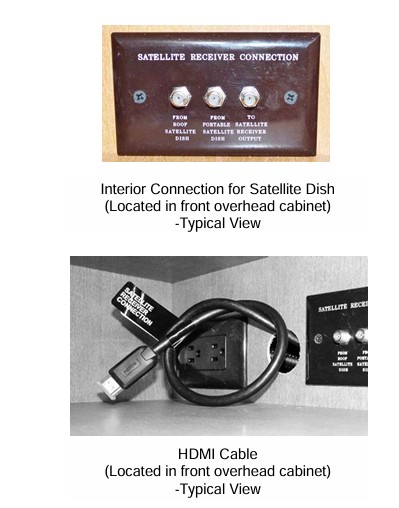
With this, you can connect a portable satellite dish to the service center coax plate or cable from the campground. Inside the cabinet you also have a Video Section System that allows you to attach a satellite receiver such as the Dish Wally. Then you can select a variety of feeds such as over the air antenna, cable, and auxiliary (aux) to the TV in the bedroom and front.
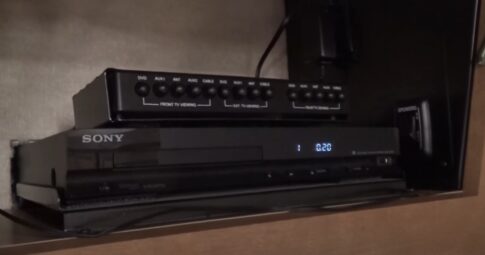
In your owner’s manual on page 8-1 it has the instructions for the Video Selection System.
Basic Operation
• Determine which TV you want to use (“FRONT TV” for lounge, “EXT. TV” for exterior TV (if equipped), or “REAR TV” for bedroom). VIDEO SELECTION SYSTEM – If equipped, the Video Selection System allows you to switch the antenna, AUX/VCR, cable TV, satellite TV, or DVD signal to any TV set location in the coach. This means one person can watch a program coming in on the roof antenna on the bedroom TV while another person watches a satellite or cable TV program or video on the front TV.
• To watch DVD: Turn the TV to Channel 3. Press the “DVD” button on Video Selection System panel.
• To watch Satellite TV (Dish): If equipped with Satellite TV, connect the satellite receiver to “Aux 1” input, then press the “AUX 1” button on Video Selection System panel.
• To watch Broadcast TV (Antenna): Press the “ANT” button on Video Selection System panel. The TV signal is amplified through the Video Selection System.
• To watch Cable TV: Press the “CABLE” button on Video Selection System panel. NOTE: “AUX 2” is available on the Front and Rear TV’s to connect an additional video source such as a video game system.
More specific information
It has more specific information on selecting cable or satellite feeds:
To Watch Cable TV
• Press CABLE TV button on MAIN TV section of Video Selection System panel.
To Watch Satellite TV (Dish)–If Equipped
• Press SAT button on MAIN TV section of Video Selection System panel
You might also enjoy this from Dave
Soft start works great for RV roof air conditioner, but now TV is pixilated. Why?
Dear Dave,
I’m hoping someone can help with this. I put a soft start on the A/C. It works great but now when the compressor runs it causes the TV to pixilate. How do I stop that? —Craig
You should enjoy these questions Dave answered
- Do ‘Tire Saver Ramps’ prolong the life of RV tires?
- Why did the lithium battery explode and flame up?
- Plugged RV’s 30-amp shoreline cord into 50-amp outlet; now RV won’t run
- How long will an RV 12-volt refrigerator run with two batteries?
- Can I tow a fifth wheel with a 1/2-ton pickup?
Dave Solberg is a leading expert in the RV industry and the author of the “RV Handbook.”
Read more from Dave here.
HAVE A QUESTION FOR DAVE?
Send your inquiries to him using the form below.
##RVDT2593

Thank you for the discussion and instructions, Dave! Have a great day and safe travels!